
WorkLink · Team Inbox
One WhatsApp inbox for your whole team
Everyone works from the same business number, with an owner on every chat. Assign each chat to a salesperson, see how long customers have been waiting, and keep every conversation on the customer's record.
Demo dataWorkLink CRM prototype. Brightway Aircon is a fictional company.
Stop running sales from personal phones
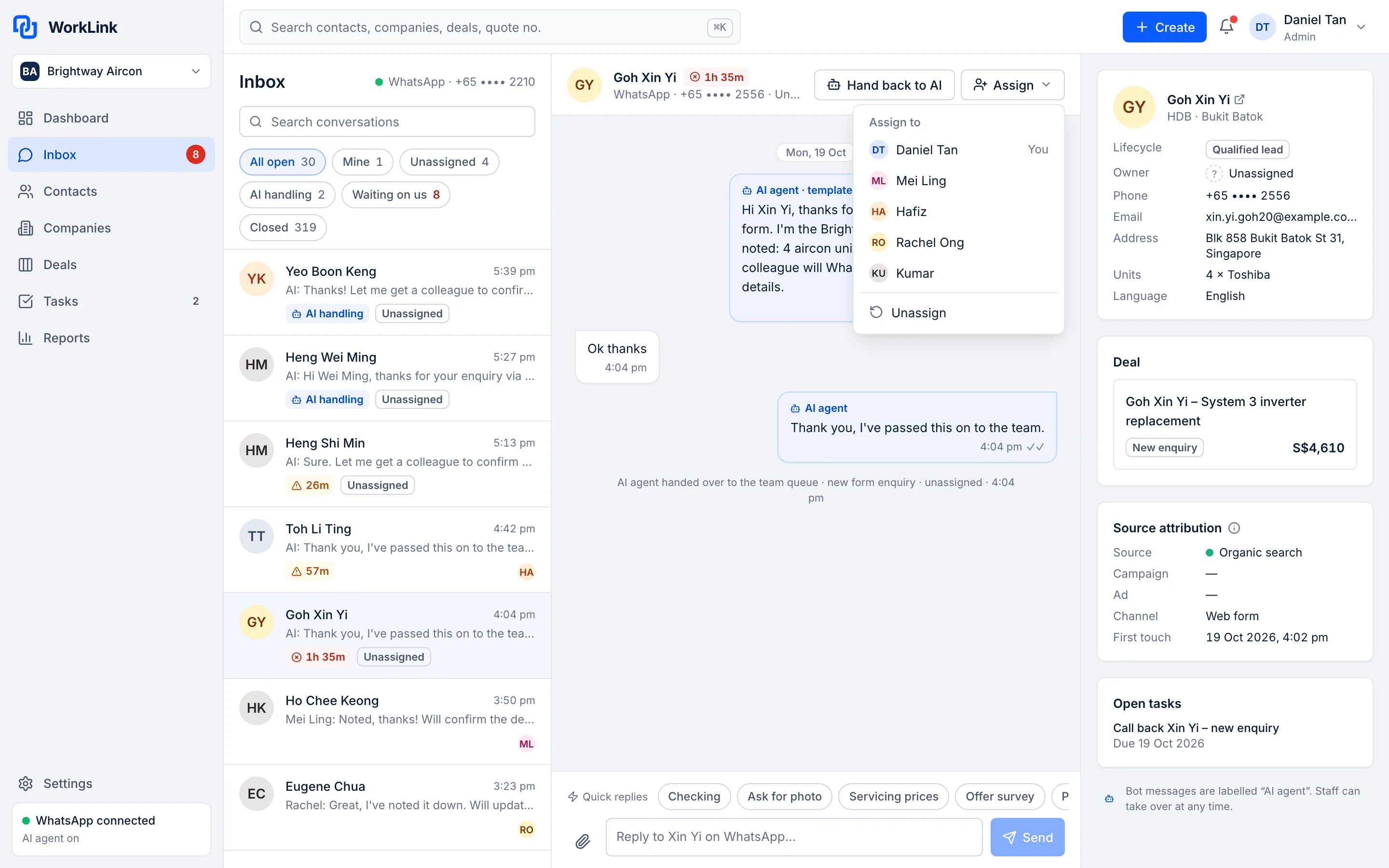
The Team Inbox puts every WhatsApp conversation in one list, with an owner, a waiting time and the customer's details beside it.
Early access. These products are not live yet. Meta onboarding for our WhatsApp integration is not complete, so we can't give a go-live date. The screens on this page come from the WorkLink CRM prototype and show fictional demo data.
-
One shared inbox
Your team sees and answers WhatsApp chats from one place.
-
An owner on every chat
Assign each chat so everyone knows who owns it.
-
Reply-time alerts
Get alerted when a customer has been waiting for a reply.
What the Team Inbox does
Shared inbox
Every WhatsApp chat in one list
Everyone works from the same business number and can see who is handling each chat. Chats the AI Chatbot is handling are tagged, and waiting-time badges show who needs a reply.
- One business number for the whole team
- See who is handling each chat
- Chats handled by the AI Chatbot are tagged (Growth and Pro)
Ownership
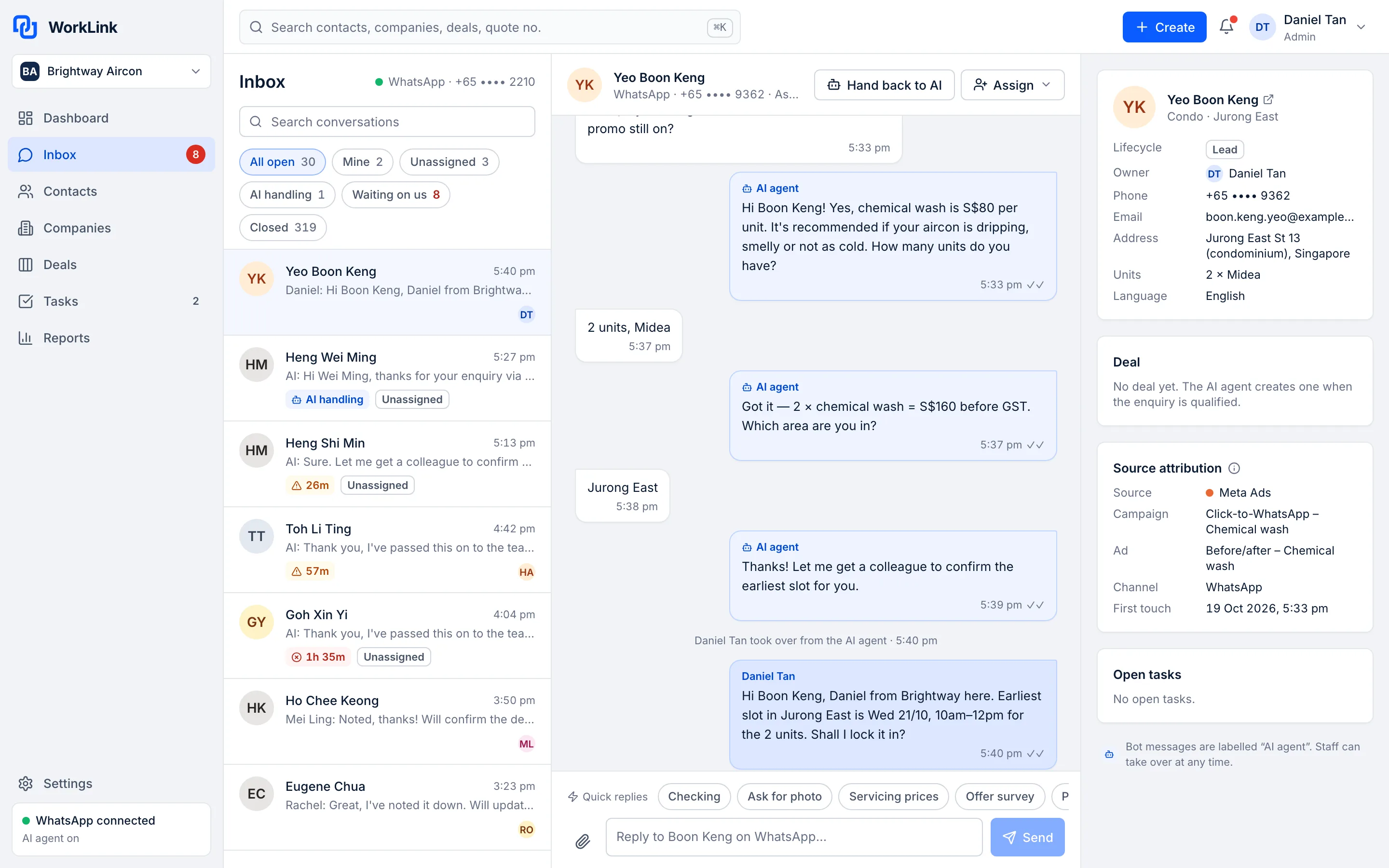
Assign each chat to a salesperson
No more “I thought you replied”. Each chat has an owner, so customers don't get two answers, or none.
- Assign and reassign chats
- Everyone can see who owns what
- Chats stay with your company when staff change
Reply speed
See who's waiting, and for how long
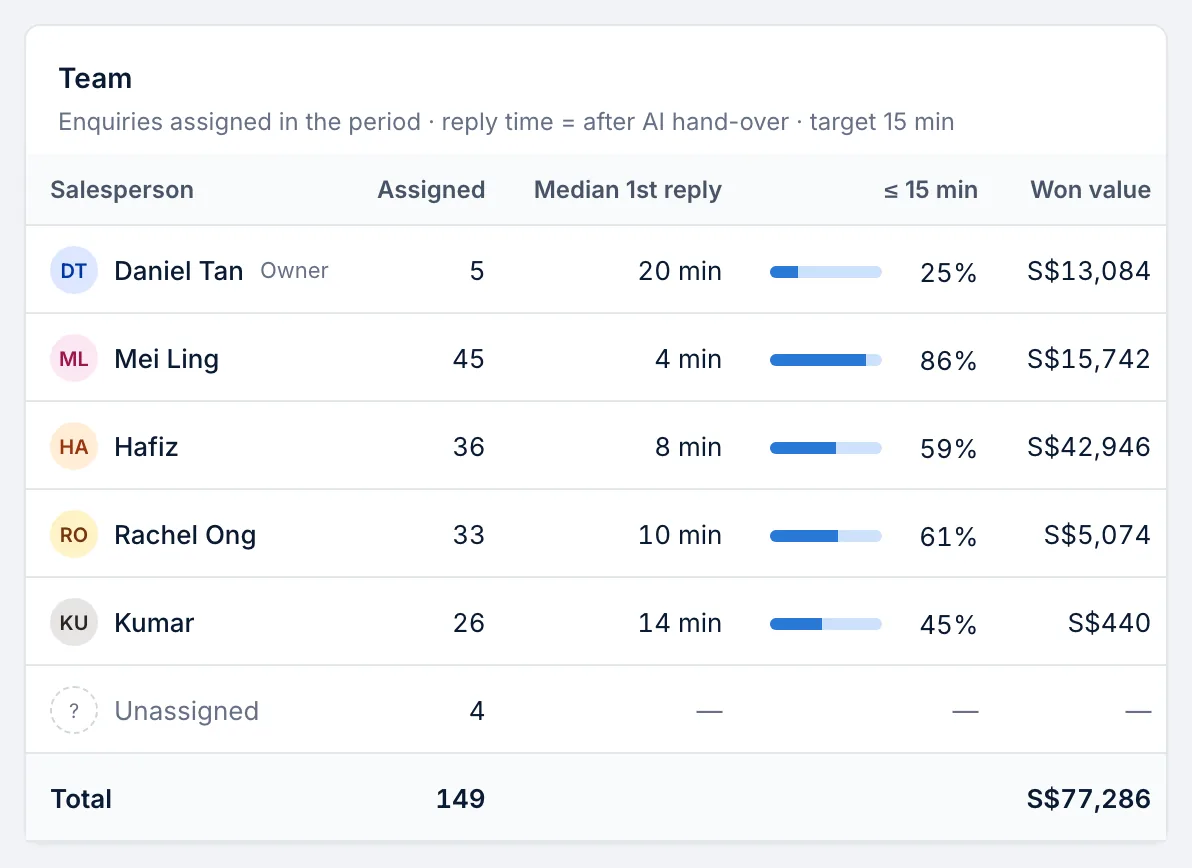
Waiting-time badges and reply-time alerts make slow replies visible while there is still time to fix them. The Owner Dashboard shows reply speed by salesperson.
- Waiting-time badge on each chat
- Alerts when a customer has been waiting
- Reply speed by salesperson in the Owner Dashboard
Context
The customer's details and ad source beside the chat
See who you're talking to before you reply: their details, the deal, and the ad or source that brought them in.
- Contact details and deals next to the chat
- The source and campaign that brought the enquiry
- One timeline per customer in the CRM

On the go
Quick replies, on a phone too
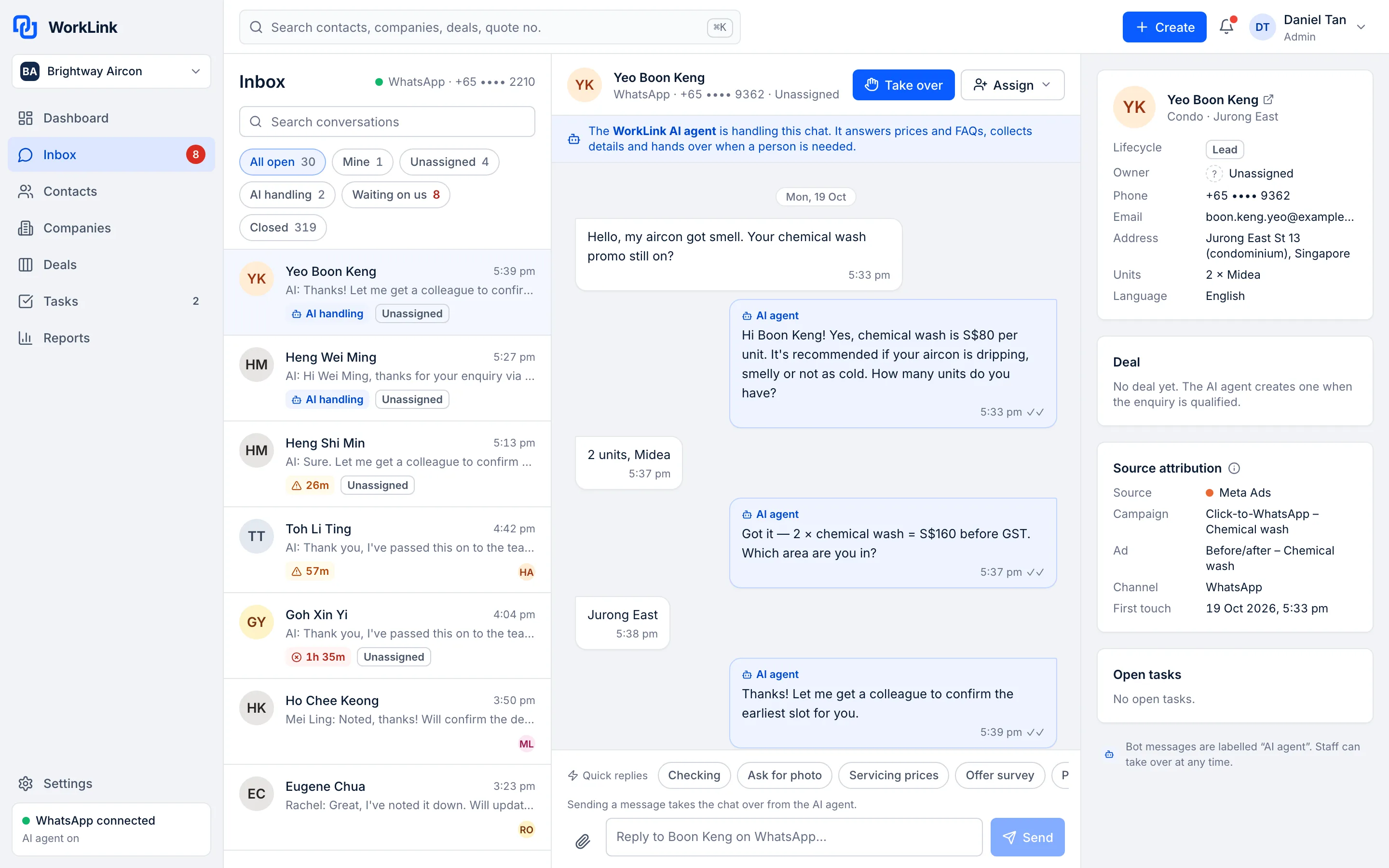
Answer from a phone screen with quick replies, and take over a chat from the AI Chatbot with one button.
- Quick replies for common answers
- Take over from the AI Chatbot
- The same inbox on a phone screen
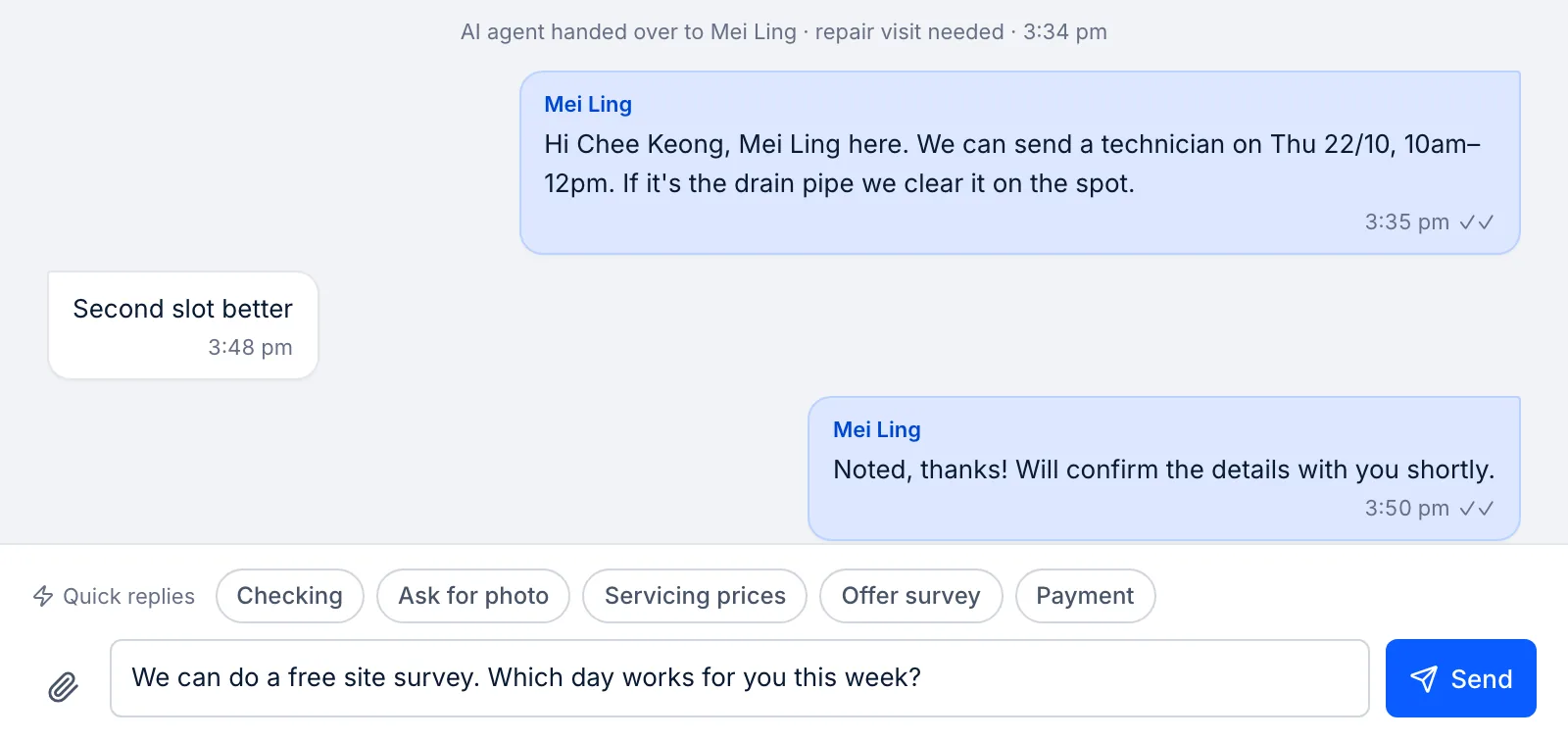
Demo dataAll screens show the WorkLink CRM prototype with a fictional company's data.
How it works
- 1Step 1
Connect your number
Your WhatsApp Business number is connected through Meta's WhatsApp Business Platform. Early access: onboarding is not complete yet.
- 2Step 2
Invite your team
Add your salespeople. Plans are priced per company, with the user limit shown on each plan.
- 3Step 3
Assign and reply
Each chat gets an owner. Waiting times and alerts keep replies moving.
- 4Step 4
Every chat on the record
Conversations sit on the customer's timeline in the CRM.
Everything in the Team Inbox
Shared inbox
All WhatsApp chats in one list.
Assignment
An owner on every chat.
Reply-time alerts
When a customer has been waiting.
Waiting-time badges
See who needs a reply first.
Quick replies
Common answers in a tap.
Customer panel
Details, deals and ad source beside the chat.
On the customer's timeline
Chats saved to the CRM record.
AI Chatbot
Answers and hands over.
Growth and Pro
Multiple WhatsApp numbers
More than one number in one inbox.
Pro
Keep the app on your phone
Use the WhatsApp Business app and the inbox on the same number (coexistence).
Coming later
The old way vs with WorkLink
Most small teams run sales on spreadsheets and replies from personal phones. Here is what changes.
The old way
Spreadsheets and personal phones
- Each salesperson replies from their own phone
- Nobody can see a chat when its owner is busy, on leave or has left
- Two people answer the same customer, or nobody does
- No way to tell how long customers have been waiting
- Chat history leaves with the staff member who had it
With WorkLink
Team Inbox
- The whole team works from one business number
- Every chat is visible to the people who need it
- Each chat has one owner
- Waiting-time badges and alerts show who needs a reply
- Conversations stay on the customer's record in the CRM
Which plan includes the Team Inbox
The Team Inbox is part of every plan, at a flat price per company. Prices in SGD.
Starter
IncludedS$49 / month per company
or S$490 a year · Up to 3 users
WhatsApp inbox (no AI)
Growth
IncludedS$149 / month per company
or S$1,490 a year · Up to 10 users
Adds the AI Chatbot, fair use of 3,000 AI replies a month
Pro
IncludedS$299 / month per company
or S$2,990 a year · Unlimited users
Adds multiple WhatsApp numbers, and fair use of 10,000 AI replies a month
Questions about the Team Inbox
Do my salespeople need their own WhatsApp numbers?
No. The team works from your business number in the shared inbox, and each chat is assigned to an owner.
Can I connect more than one WhatsApp number?
Multiple WhatsApp numbers are part of the Pro plan.
Is the AI Chatbot included?
The AI Chatbot is included from the Growth plan. Starter includes the WhatsApp inbox without AI.
Can I keep using the WhatsApp Business app on my phone?
We plan to support using the WhatsApp Business app on your phone and the inbox on the same number at the same time (Meta calls this coexistence). This is not available yet.
Do I pay per user?
No. Each plan is one price for your company. The plan sets how many users you can add: up to 3 users on Starter, up to 10 users on Growth, unlimited users on Pro.
Who pays for WhatsApp messages?
WhatsApp message fees are set by Meta. You pay them to Meta directly, at cost. We add no markup.
When can I start?
The product is in early access and we can't give a go-live date yet, because Meta onboarding for our WhatsApp integration is not complete. Join early access and we'll contact you when we can set you up. You can try the live demo today.
Try the Team Inbox in the live demo
Click around a fictional company's account, then join early access. We'll contact you when we can set you up. No go-live date is promised.