
WorkLink · AI Chatbot
Better than your salesperson
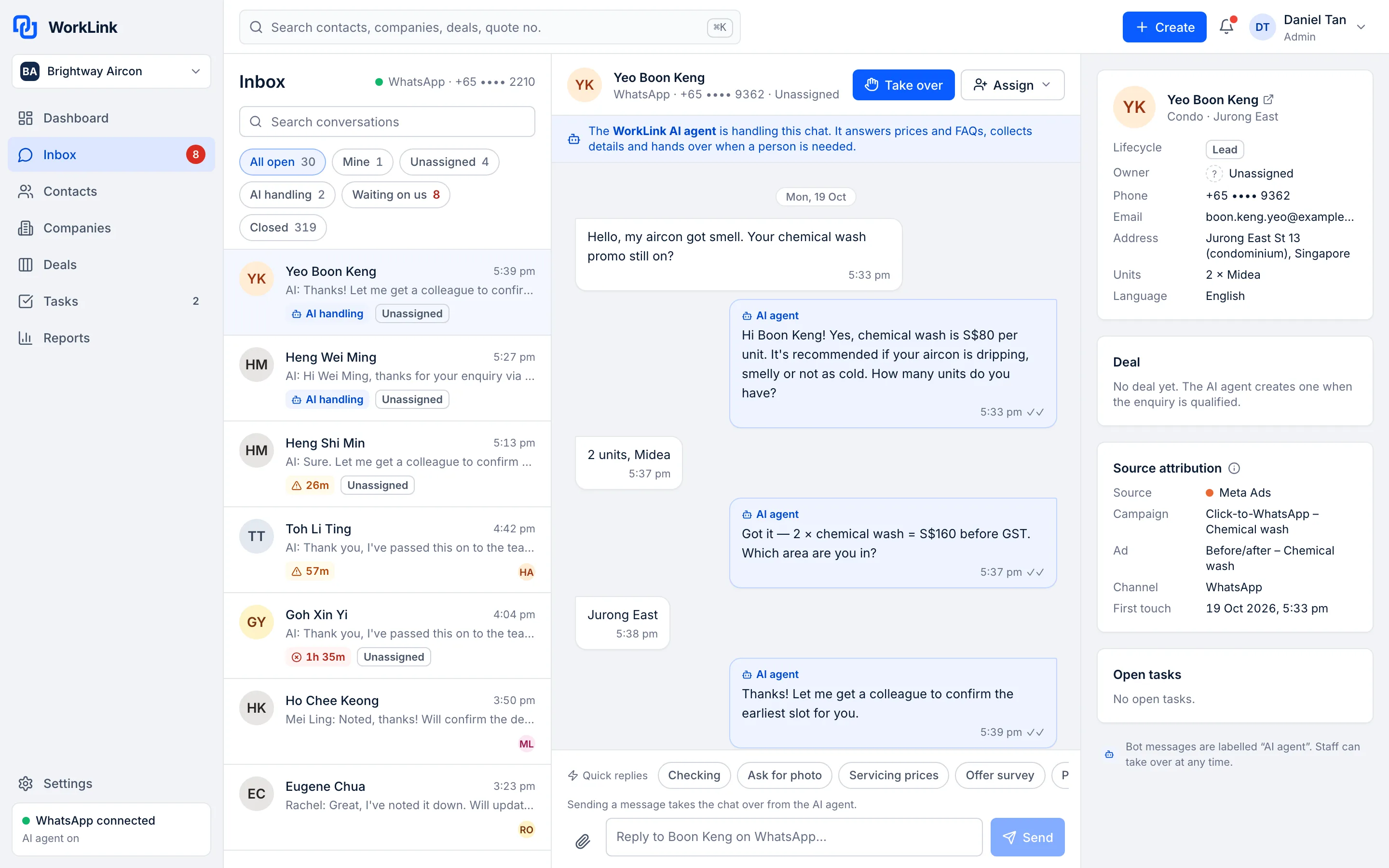
Patient, professional and online 24 hours. Built on the latest AI models, the AI Chatbot answers WhatsApp enquiries on your own number with your prices and your team's know-how, sends brochures and photos, books site surveys, and hands the chat to your team when a person is needed.
Demo dataWorkLink CRM prototype. Brightway Aircon is a fictional company.
Patient, professional and online 24 hours
The AI Chatbot works inside the Team Inbox. Your staff see every reply it sends, and can step in at any point.
Early access. These products are not live yet. Meta onboarding for our WhatsApp integration is not complete, so we can't give a go-live date. The screens on this page come from the WorkLink CRM prototype and show fictional demo data.
-
Patient
Answers the tenth question as carefully as the first.
-
Professional
Answers from the prices, products and policies you give it.
-
Online 24 hours
Replies at night, at weekends and on public holidays.
What the AI Chatbot does
Replies
Understands what customers mean
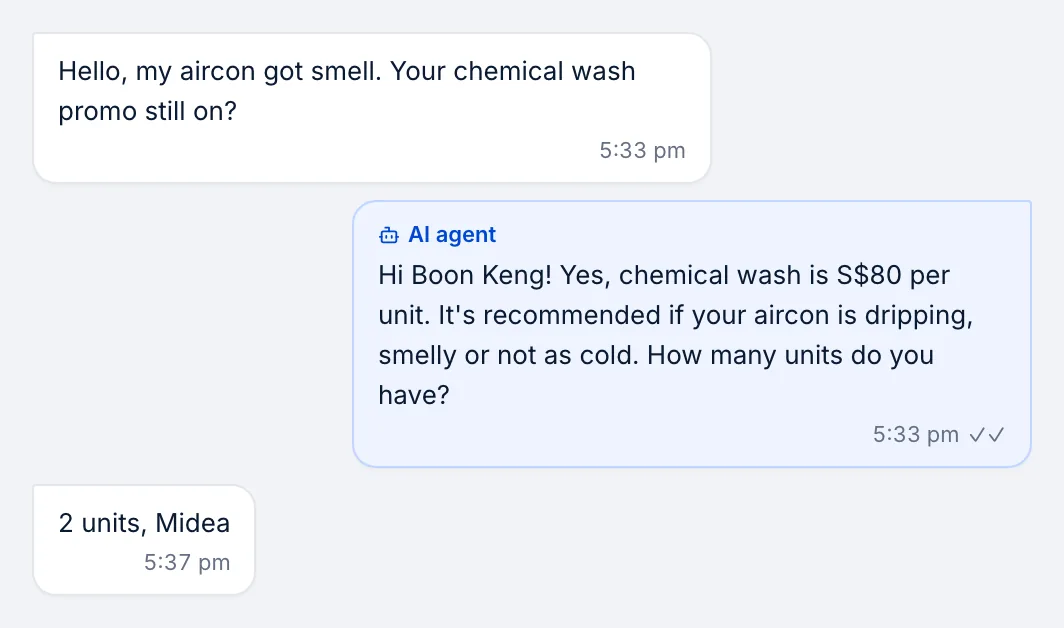
Built on the latest AI models, it understands what customers really ask, by text, photo or voice message, and answers from your prices, services and your team's example replies. It isn't the old kind of chatbot that keeps asking questions or answers something else.
- Customers ask in their own words: no menus or buttons to press
- Every AI reply is labelled in the inbox, so staff can see what it said
- You provide the prices, promises and product details it uses
Files
Sends brochures, photos and quotes
No more scrolling through a phone gallery to find the right brochure. The AI Chatbot sends the brochures and product photos you've given it, and quotes from your price list: a price for fixed-price items, or a range when the job needs a site visit.
- Brochures, price lists and product photos you provide
- Quotes only from your own price list
- Visible to your team in the Team Inbox
Bookings
Books site surveys
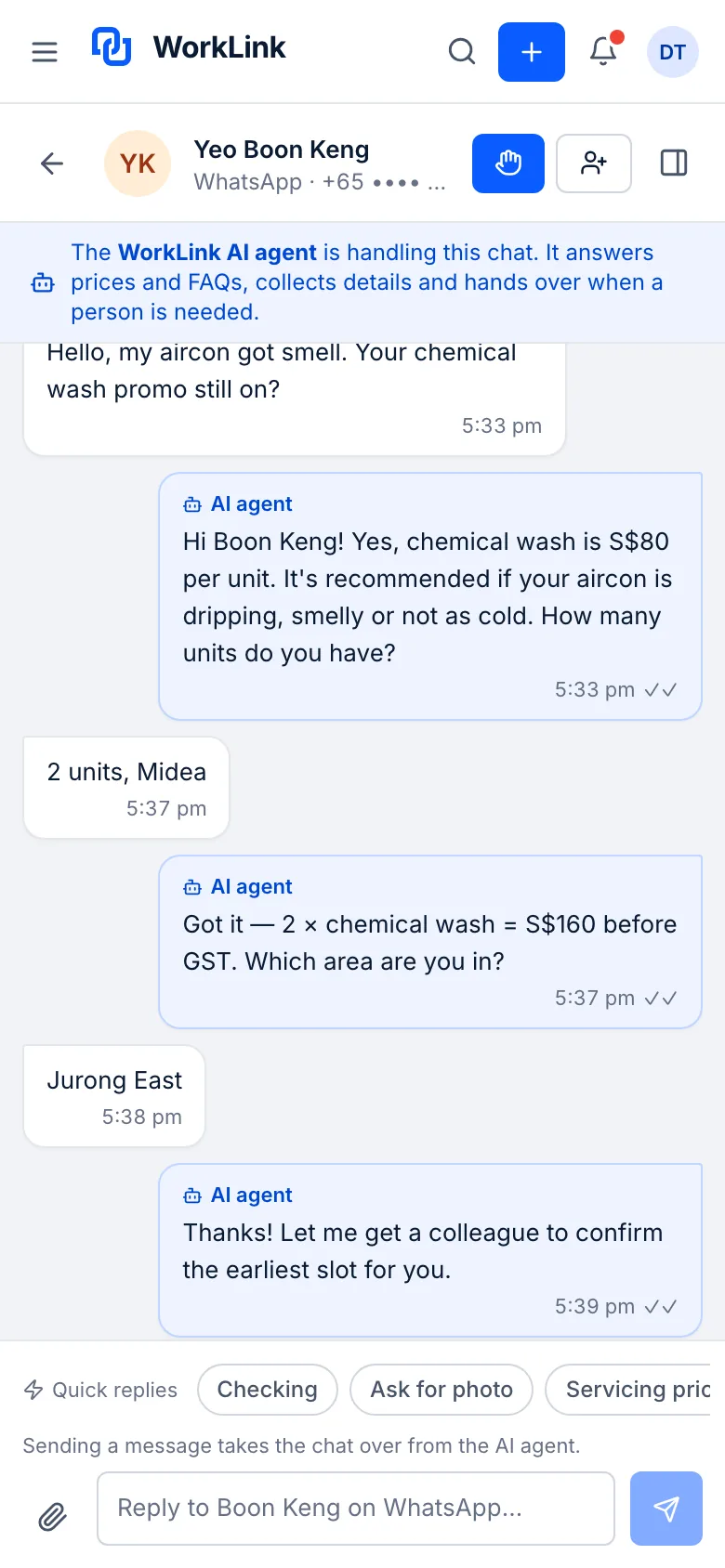
When a customer is ready, the AI Chatbot books a site survey in the chat, so your team picks up a warm lead with the details already collected.
- Collects the details your team needs first
- The whole conversation stays on the customer's record
- Your team confirms and follows up

Hand-over
Hands over to your staff, and stays out of the way
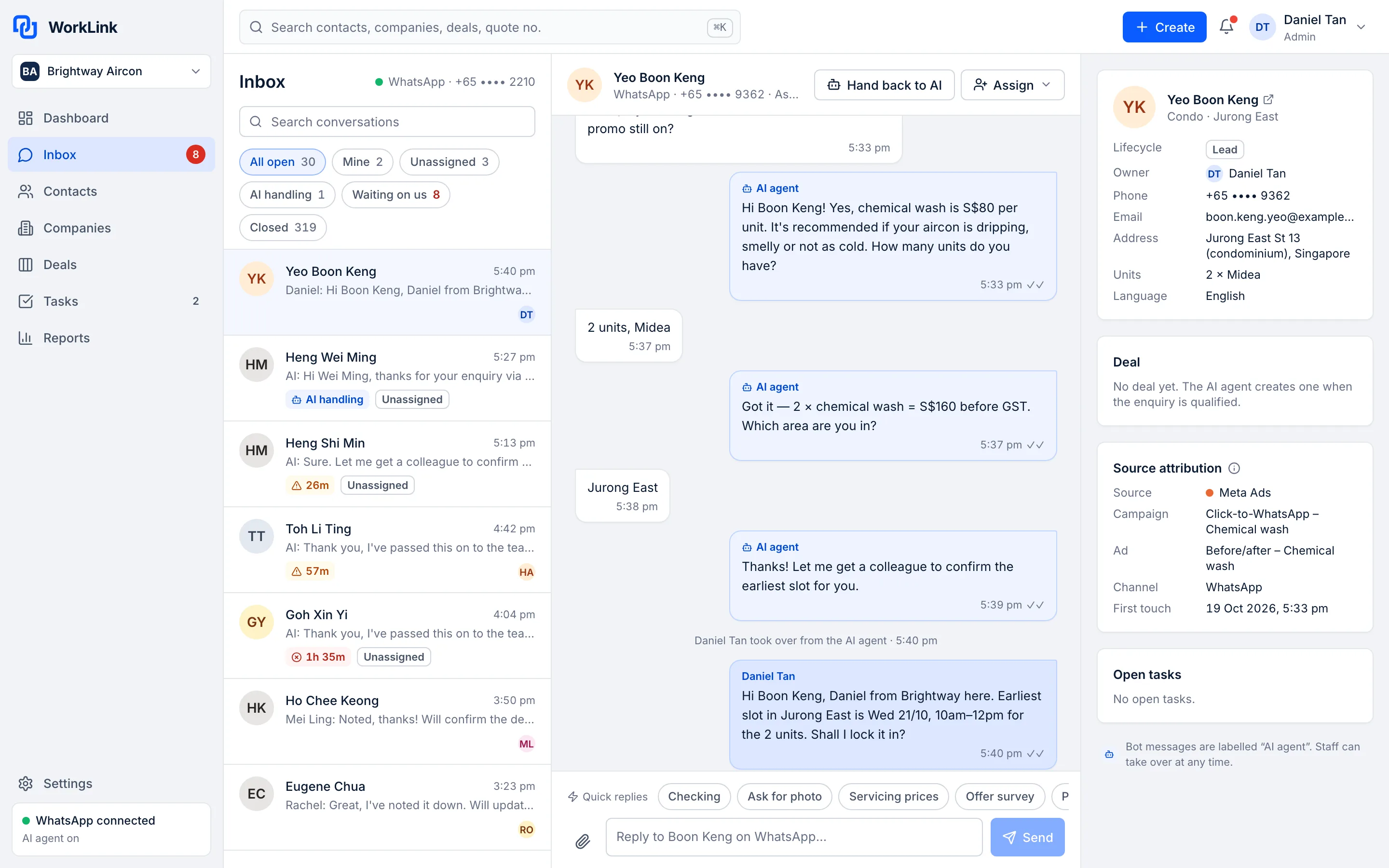
When a person is needed, your team takes over the chat. Once someone takes over, the AI stops replying in that chat until it is handed back.
- Take over any chat at any time
- A clear note in the chat shows who took over and when
- Hand the chat back to the AI when you're done
Demo dataAll screens show the WorkLink CRM prototype with a fictional company's data.
How it works
- 1Step 1
Connect your number
Your WhatsApp Business number is connected through Meta's WhatsApp Business Platform. Early access: onboarding is not complete yet.
- 2Step 2
Give it your information
Prices, services, brochures, common questions and example replies from your sales team. Or let us do it: done-for-you setup is S$490, waived on annual plans.
- 3Step 3
It replies and collects details
Customers get answers on your number, and the AI Chatbot collects what your team needs.
- 4Step 4
Your team takes over
Staff pick up the chat in the Team Inbox whenever a person is needed.
Everything in the AI Chatbot
Replies on your number
Your own WhatsApp Business number.
Brochures, photos and quotes
Sends your files, and quotes from your price list.
Reads photos
Such as a floorplan or a site photo.
Site survey booking
Books the visit in the chat.
Collects details
Such as the number of units and the area.
Labelled AI replies
Staff can see what the AI said.
Take over and hand back
Staff can take over any chat at any time.
Works in the Team Inbox
One place for AI and staff replies.
AI replies a month
Fair use: up to 3,000 on Growth, up to 10,000 on Pro.
Growth and Pro
Not used to train AI
We do not use your WhatsApp conversations to train AI models.
Keep the app on your phone
Use the WhatsApp Business app and the chatbot on the same number (Meta calls this coexistence).
Coming later
Voice messages
Turns voice messages into text and answers them.
The old way vs with WorkLink
Most small teams run sales on spreadsheets and replies from personal phones. Here is what changes.
The old way
Spreadsheets and personal phones
- Enquiries land on one salesperson's personal phone
- The same questions about prices and services answered by hand, again and again
- Brochures hunted down in a phone gallery and forwarded one by one
- When that person is busy or on leave, nobody else can see the chat
- Customer details copied into a spreadsheet later, if at all
With WorkLink
AI Chatbot
- Enquiries arrive on your business number, in one shared inbox
- Common questions answered by the AI Chatbot from the information you give it
- Brochures and photos sent in the chat when the customer asks
- Any colleague can read the chat and take over
- The conversation sits on the customer's record in the CRM
Which plan includes the AI Chatbot
The AI Chatbot comes with the CRM and Team Inbox in one plan, at a flat price per company. Prices in SGD.
Starter
Not includedS$49 / month per company
or S$490 a year · Up to 3 users
Team Inbox without AI
Growth
IncludedS$149 / month per company
or S$1,490 a year · Up to 10 users
AI Chatbot, fair use of 3,000 AI replies a month
Pro
IncludedS$299 / month per company
or S$2,990 a year · Unlimited users
Everything in Growth, fair use of 10,000 AI replies a month, plus multiple WhatsApp numbers
Questions about the AI Chatbot
Can it read photos and voice messages?
Yes. It reads the photos customers send, such as a floorplan or a site photo, and answers with what it sees. Voice messages are turned into text automatically, so it answers them like a typed message. If it can't make out a voice message, it asks the customer to type it.
Can it give prices?
Yes, only from the price list you give it: a price for fixed-price items, or a range when the job needs a site visit. You decide what it may quote.
How can it be better than my salesperson?
It doesn't replace your team. It takes the first reply and the common questions: it is patient with every customer, answers from the prices and products you give it the same way every time, and replies at any hour. When a customer needs a person, such as for a discount or a complaint, it hands the chat to your team. It runs on the latest AI models and is set up with your price list, your answers to common questions and example replies from your team. It doesn't pretend to be a person: our Terms ask you to let customers know they are chatting with an automated assistant.
Is this a general-purpose AI assistant?
No. It is sales and customer-service automation for conversations between your business and your own customers. It answers from the information you give it.
Can my staff take over a chat?
Yes. Your team can take over any chat at any time in the Team Inbox. Once someone takes over, the AI stops replying in that chat until it is handed back.
Which WhatsApp number does it use?
Your own WhatsApp Business number, connected through Meta's WhatsApp Business Platform. Customers message your business, not a separate bot account.
Can I keep using the WhatsApp Business app on my phone?
We plan to support using the WhatsApp Business app on your phone and the chatbot on the same number at the same time (Meta calls this coexistence). This is not available yet.
How many AI replies are included?
The Growth plan includes a fair-use allowance of up to 3,000 AI replies a month, and Pro up to 10,000. If you expect more, tell us before you sign up.
Do you use my conversations to train AI?
No. We do not use your WhatsApp conversations to train AI models. See our Privacy Policy.
Who pays for WhatsApp messages?
WhatsApp message fees are set by Meta. You pay them to Meta directly, at cost. We add no markup.
When can I start?
The product is in early access and we can't give a go-live date yet, because Meta onboarding for our WhatsApp integration is not complete. Join early access and we'll contact you when we can set you up. You can try the live demo today.
Try the AI Chatbot in the live demo
Click around a fictional company's account, then join early access. We'll contact you when we can set you up. No go-live date is promised.