WorkLink · Ads Check, Ads Fix & Ads Care

Find out where your Google and Meta ad budget really goes

Fixed-price help for Google Ads and Meta Ads accounts. Start with a written audit, have us make the fixes, or let us look after the account every month.

  • S$490Ads Check, one-off
  • 40points checked
  • 5working days to the report

Sample report · fictional business

Three ways to work with us

Prices in SGD. Ad spend is paid by you to Google or Meta directly and is not included.

Ads Check

S$490one-off

A written audit of one ad account.

  • One platform: Google Ads or Meta Ads
  • Read-only access, last 90 days
  • Written report in English and a 30-minute walkthrough
  • Delivered in 5 working days
Ask about Ads Check

Audit + fixes

Ads Fix

S$1,490one platform

S$2,490 for Google Ads and Meta Ads together

The audit, plus we make the fixes.

  • Everything in Ads Check
  • We make the fixes you approve
  • Done in 10 working days
  • Re-check 14 days after the fixes, compared with the period before
Ask about Ads Fix

Ads Care

S$590/ month

For ad spend up to S$10,000 a month

Monthly upkeep. No lock‑in.

  • Weekly search-term clean-up
  • One-page report every month
  • Tracking checks
  • No lock‑in contract
Ask about Ads Care

See exactly what you get

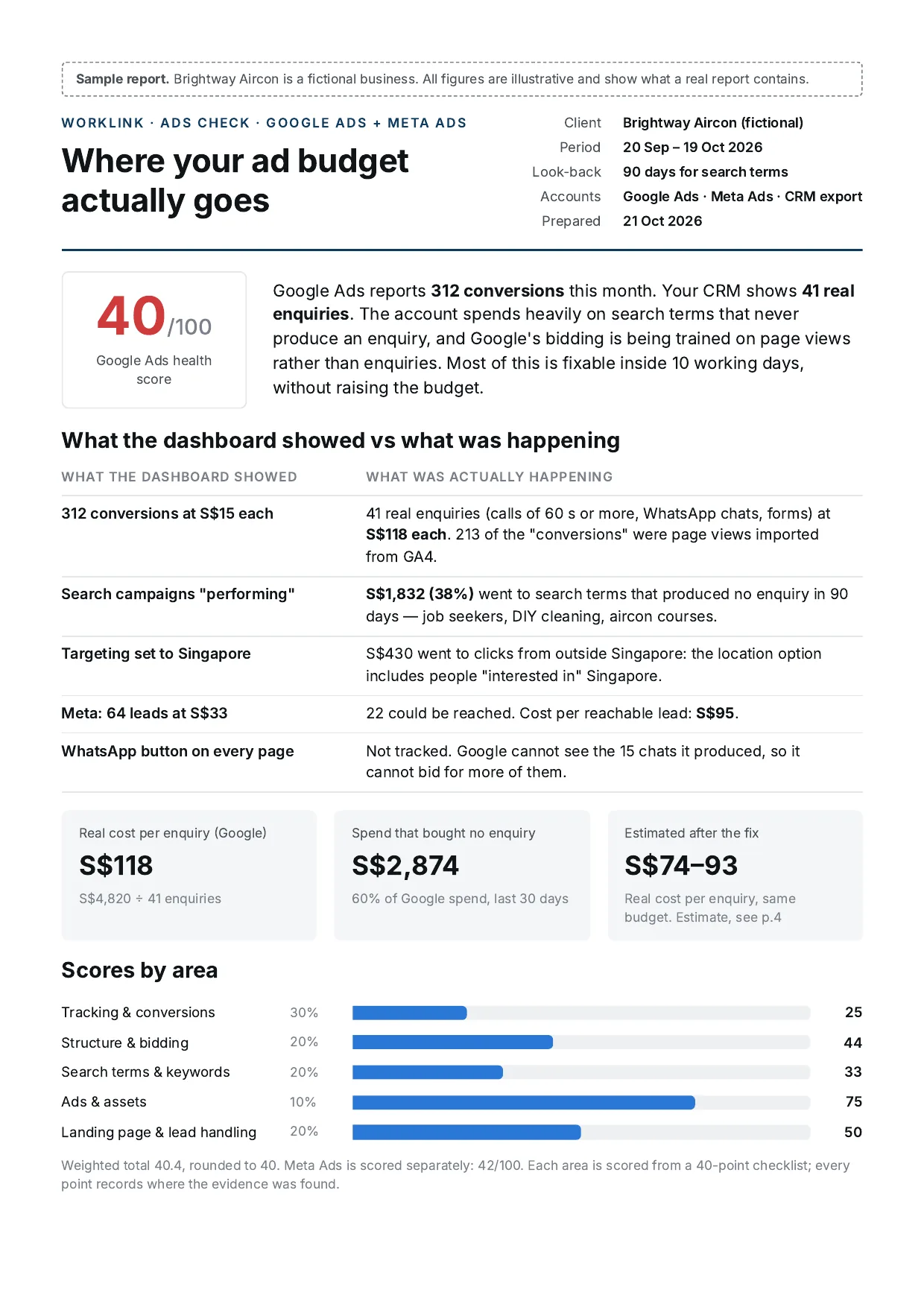
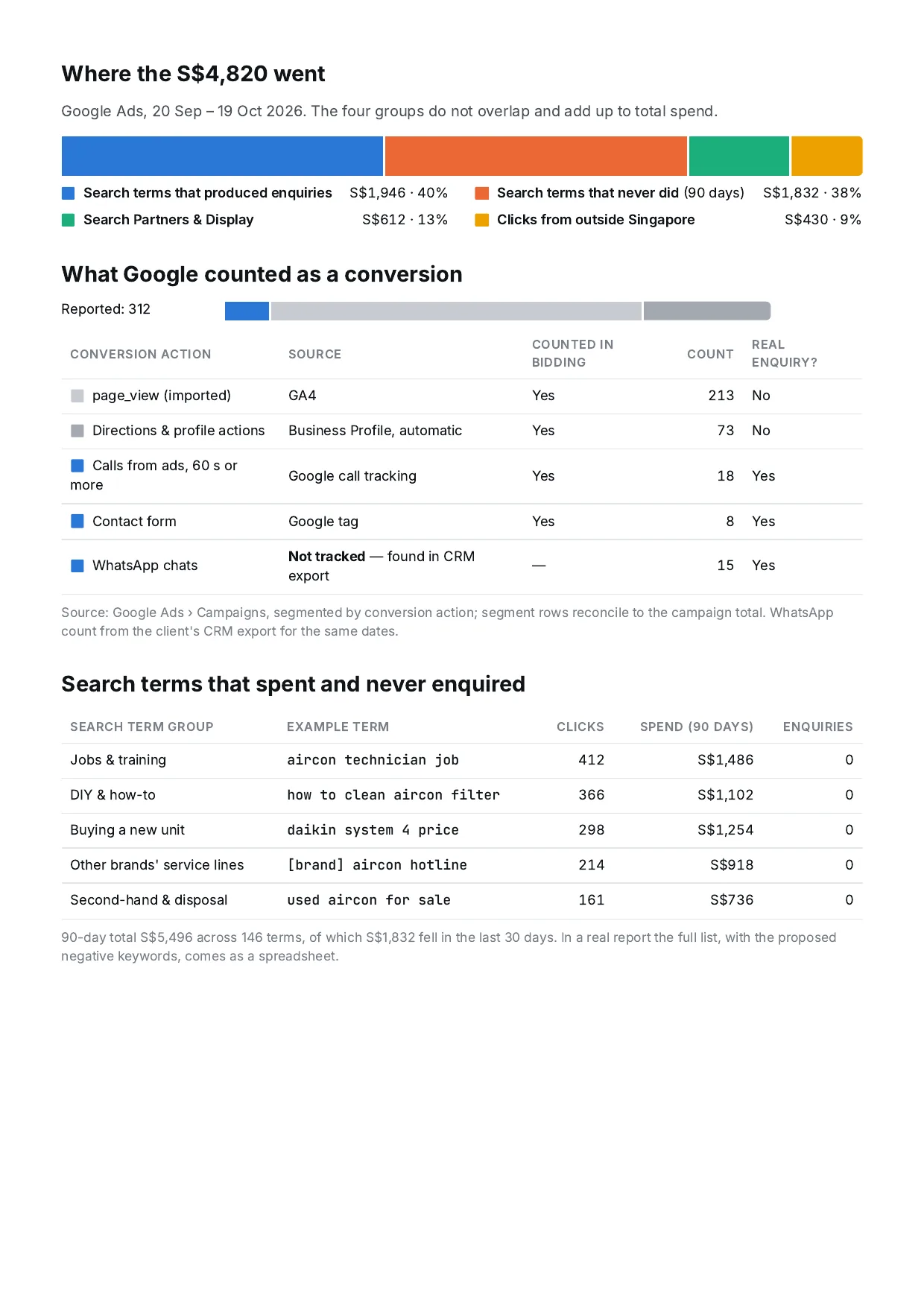
A complete Ads Check report for a fictional business. All figures in it are illustrative. Click a page to enlarge it.

Download the PDF4 pages, 585 KB

  • Page 1: summary and scores

  • Page 2: where the money went

  • Page 3: findings, evidence and fixes

  • Page 4: the fix plan, day by day

What the report shows

  • Where the money went, in four groups that don't overlap: spend that brought enquiries, search terms that never did, Search Partners and Display, and clicks from outside Singapore.
  • Real enquiries: forms, qualifying calls and WhatsApp chats started. If you share a CRM export, we check against it. If not, the report says so.
  • Findings in order of impact, each with its evidence and the fix.
  • A range, not a promise. We estimate what could improve and show how we worked it out. We don't guarantee enquiry numbers or costs.

A 40-point checklist, in six areas

Each point is marked as fine, needs attention, or a problem, with a note of where we found the evidence. Area scores are weighted into a score out of 100. Meta Ads is scored on its own.

  • ATracking and conversions30%
  • BStructure and bidding20%
  • CSearch terms and keywords20%
  • DAds and assets10%
  • ELanding page and lead handling20%
  • FMeta Ads (if used)Scored separately
A Tracking and conversionsIs the account counting real enquiries, and is bidding learning from them? 10 points · 30%
  1. 1Where each conversion action comes from: a tag on your site, an import from Google Analytics, Google Business Profile, or calls
  2. 2Which actions are set as Primary, so they are used for bidding. Page views, scrolls and map-direction clicks should not be
  3. 3Conversions for each campaign, broken down by conversion action, and whether the parts add up to the total
  4. 4Whether WhatsApp clicks, call clicks and form submissions each have their own action, with data in the last 30 days
  5. 5The minimum call length that counts as a conversion (we suggest at least 60 seconds)
  6. 6Whether counting one or every conversion per click suits your business. We ask what you decided before suggesting a change
  7. 7Whether enhanced conversions (Google) and the Conversions API (Meta) are switched on
  8. 8Whether won deals are sent back from your CRM to Google and Meta
  9. 9Whether your Google Tag Manager container really loads on your site, tested in a browser
  10. 10The conversion window and the attribution model
B Structure and biddingIs the money going where the account thinks it is? 8 points · 20%
  1. 11What the bid strategy is optimising for, and whether that is a real enquiry
  2. 12Whether Search Partners and the Display Network are switched on inside Search campaigns
  3. 13The location option: people in Singapore, or people in or interested in Singapore
  4. 14The ad schedule: how much is spent at night, and whether anyone answers enquiries then
  5. 15Device bid adjustments
  6. 16Whether the campaigns limited by budget are the ones that perform best
  7. 17Whether auto-applied recommendations are switched on
  8. 18Whether Performance Max or Demand Gen campaigns take your brand searches, and whether their conversions can be trusted
C Search terms and keywordsWhat are people actually searching for when your ads show? 6 points · 20%
  1. 19Search terms that spent money in the last 90 days without bringing a single enquiry, with the amount and share of spend
  2. 20Search terms that will not turn into enquiries, such as jobs, training, DIY, second-hand, price comparisons and competitor models
  3. 21Negative keyword lists: whether they exist, and whether they cover the terms above
  4. 22Match types, and how far AI Max or broad match expands your keywords
  5. 23Whether brand terms have their own ad group. We never pause brand terms; we only make recommendations
  6. 24High-spend keywords with a Quality Score below 5
D Ads and assetsDo the ads say the right thing, and say it honestly? 4 points · 10%
  1. 25Responsive search ad strength, and whether headlines are pinned
  2. 26Assets: call, WhatsApp or message, sitelinks, callouts and structured snippets
  3. 27Whether claims in the ads match the landing page, without overstatement
  4. 28Meta: frequency for each ad set, and creative fatigue (click-through rate falling week on week)
E Landing page and lead handlingWhat happens after the click, and after the enquiry? 6 points · 20%
  1. 29Mobile page speed (Largest Contentful Paint, measured with PageSpeed Insights)
  2. 30Whether WhatsApp and call buttons appear near the top of the page, and whether taps on them are tracked
  3. 31The number of form fields
  4. 32The median time to first reply, from your CRM or WhatsApp export
  5. 33The share of enquiries not answered within 24 hours
  6. 34Who handles enquiries at night and at weekends
F Meta Ads (if used)Meta is scored on its own and not added to the Google score. 6 points · Scored separately
  1. 35Pixel events: PageView only, or also Lead and Contact
  2. 36The Conversions API and event match quality
  3. 37Instant form type (more volume or higher intent), and the share of invalid phone numbers
  4. 38Retargeting audiences: whether they exist and are in use, and whether their source pixel is still active
  5. 39Placements: whether limited spend on excluded placements is allowed, checked on the ad set itself rather than from same-day numbers
  6. 40Whether the campaign objective matches the event it optimises for, for example a conversations objective that optimises for clicks

From read-only access to a re-check

Read-only first. Every change listed, approved in writing and logged, so it can be undone.

  1. 1Day 0

    Read-only access

    You add us as a read-only user. We never need your passwords.

  2. 2Within 5 working days

    Report and walkthrough

    Scores by area, where the money went, and fixes in order of impact, with a 30-minute walkthrough.

  3. 3Ads Fix

    Change list, your OK

    What changes, the value before and after, and how to roll it back. Nothing changes until you confirm in writing.

  4. 4Within 10 working days

    Fixes made and logged

    We screenshot before and after, and log each change the same day.

  5. 514 days later

    Re-check

    We compare the results with the same length of time before the change.

Access we ask for

Google AdsRead-only user. Standard access only if you choose Ads Fix.
Meta AdsPartner access with “View performance”. “Manage campaigns” only for Ads Fix.
Google Analytics and Tag ManagerViewer or read access.
WebsiteWe don't ask for your website password.
CRM or WhatsApp (optional)An export of the last 90 days of enquiries: date, source, and whether it closed.
Step-by-step: how to give read-only access

Fixed prices

Prices in SGD. Ad spend is not included.

ServiceWhat you getPrice
Ads CheckWritten audit of one platform (Google Ads or Meta Ads), last 90 days, with a 30-minute walkthroughS$490
Ads Fix, one platformAds Check, plus we make the fixes you approve and re-check 14 days laterS$1,490
Ads Fix, both platformsThe same for Google Ads and Meta Ads togetherS$2,490
Ads CareMonthly care for ad spend up to S$10,000 a month. No lock‑in.S$590 / month

Questions about the ads services

Do you need my passwords?

No. You invite us as a read-only user on Google Ads and give our business partner access with “View performance” on Meta. We don't ask for your website password. See how to give read-only access.

Do you guarantee more enquiries or a lower cost?

No. We don't guarantee enquiry numbers or costs. When we estimate an improvement, we give a range and show how we worked it out.

Will you change anything in my account during an Ads Check?

No. Ads Check is read-only. With Ads Fix and Ads Care, nothing changes until you confirm the change list in writing.

Do I need a CRM export?

It's optional, but it makes the audit more accurate: a spreadsheet of the last 90 days of enquiries with the date, source and whether each one became a customer. Please remove names, phone numbers and email addresses first. If you don't share one, the report says so.

Is ad spend included?

No. Ad spend is paid by you to Google or Meta directly and is not included.

Can I stop Ads Care?

Yes. Ads Care has no lock‑in contract.

Book an Ads Check

Tell us which platform you use and roughly what you spend each month. We'll reply with what we need to start.